
Esther BarraAuthor

Björn Busch-GeertsemaAuthor
Published
30. November 2023
Topics
Development, Concept, DXP, Operate
Smart video encoding for Storyblok: Our solution for perfect performance
Video content is becoming increasingly important for digital presences; it simplifies information processing for users and boosts their time on site. With the goal of ensuring perfect video content management via Storyblok's CMS, we have developed a customized video encoder plug-in—which we will present in more detail below.
From bottleneck to performance boost:
Seamless video management with our latest plug-in
Using video content is not just a challenge from a creation standpoint; it also requires proper content management. Not all formats and codecs are suitable for online use—and very few browsers are compatible with all codecs. Additionally, file quality and size must be perfectly balanced, as large files lead to long loading times, which can negatively impact both user experience and Google rankings. Ensuring optimal display across various devices, screen sizes, and data transfer rates also requires special attention.
Choosing the right CMS can be crucial here. When creating a DXP (Digital Experience Platform) tailored exactly to a client's needs, we at Ergosign utilize a wide range of state-of-the-art technologies. This includes various content management systems, such as Storyblok. This CMS impresses with an excellent editor experience and offers our clients numerous other advantages. While Storyblok has a well-thought-out approach to managing images and graphics, video encoding and management still offer room for improvement—as is the case with most CMS platforms. Precisely because Storyblok’s asset management for images and graphics is so successful, we decided against the usually recommended path of an external all-in-one app integration.
Instead, we developed a plug-in that integrates seamlessly into Storyblok, handling and simplifying both video encoding and content management. Of course, we aren't keeping this plug-in to ourselves: In the future, we plan to offer licenses for the plug-in and the dedicated cloud service we developed for it.
Maximum compatibility, minimal load time:
Flawless video streaming in every browser.
Using a web service also developed by us, our plug-in automatically encodes videos into various codecs and provides editors with helpful feedback on file size and estimated loading times for end users. Currently, we have defined three codecs that cover all common browsers: H.264 (for older devices with less powerful graphics support), VP9 (for Safari and Firefox), and AV1 (the new industry standard and for Chrome).
Encoding is performed for three screen sizes with the following horizontal resolutions: 768px, 1280px, and 1920px. This means the optimal resolution for nine different use cases (for those who’ve done the math 😉) is pre-rendered. While the target dimensions are fully customizable, we find these three specific sizes to be the most practical.
Automated video workflows for happy editorial teams
The result enables an acceleration in loading times of 50–80% (!), as the appropriate variant is automatically delivered to the correct output device. This is supported by 'Responsive Video,' a custom block developed by us. Furthermore, this approach saves significant data volume: instead of uploading multiple versions of the same video and manually linking them to different requirements, our plug-in handles everything automatically with just a single video version. This allows us to considerably reduce traffic—while the editorial error rate tends toward zero. Video encoding can quickly become very technical (and frustrating!), which doesn't always align with the skill set of an editorial team. We are proud that our plug-in contributes to a significantly better editor experience.
In terms of usability, our plug-in is in no way inferior to Storyblok’s image content management: videos are fully integrated into the Storyblok asset system. When a video is selected, a preview is generated, ensuring editors know exactly how it will appear to the users.
Recommendations for accessible video content:
Adhering to accessibility standards when creating video content is crucial to ensuring that your message reaches the widest possible audience. Accessible video content thus expands your potential reach. You can achieve this improvement, for example, by adding captions and transcripts to your videos. Audio descriptions are helpful for videos featuring visual elements or scenes without dialogue. Equally important is the design of sufficient contrast, particularly regarding the readability of subtitles and the careful choice of color schemes.
Innovation in every detail – the key to an optimized digital experience.
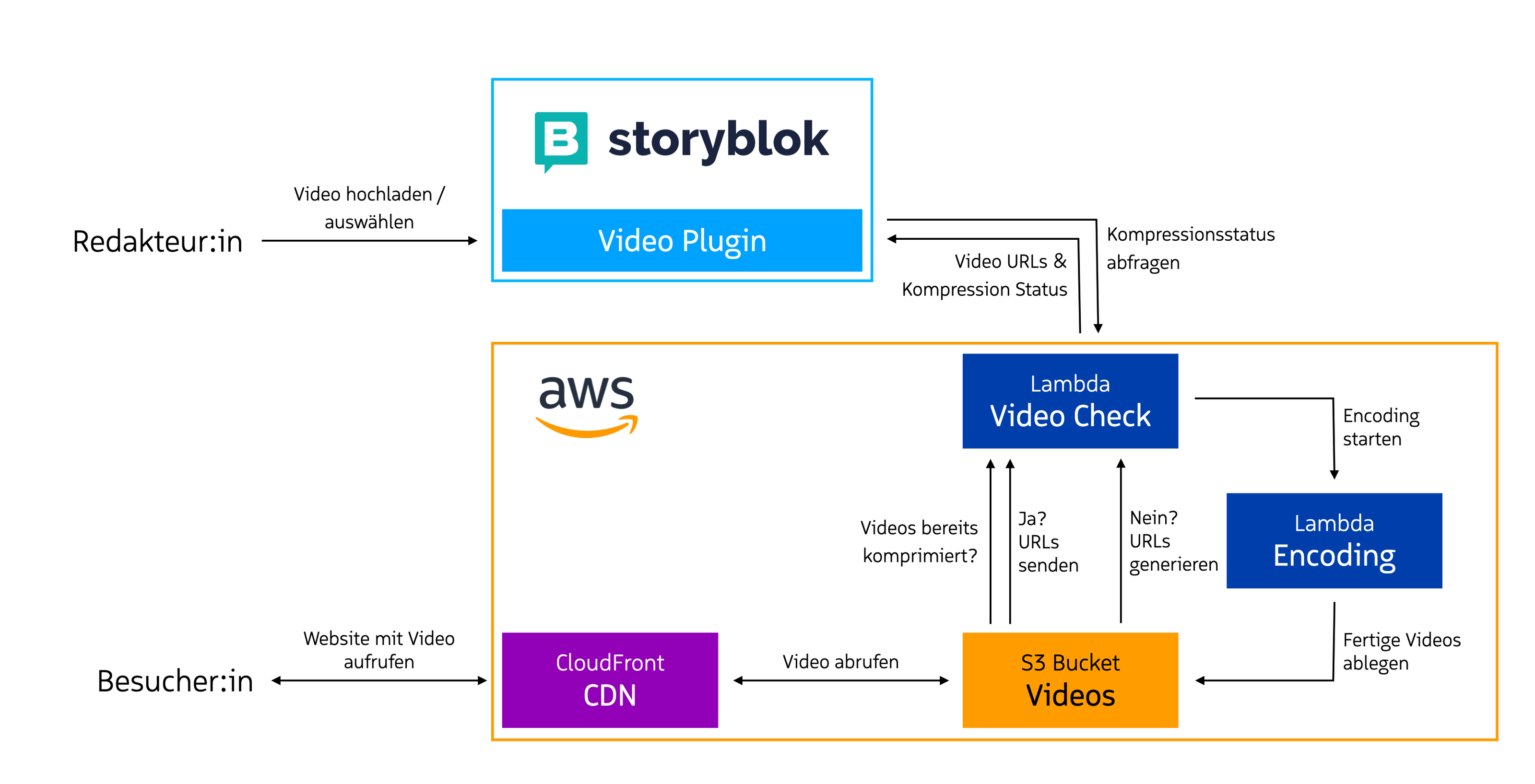
When a video is selected in Storyblok, the plug-in checks whether the video is already available in the required sizes and codecs. If not, these are generated immediately. The URLs of the compressed videos, which are stored on our own CDN, are saved in Storyblok along with information regarding the settings. The web service itself remains invisible to the end users. For compression, we use FFmpeg—the industry standard for this task for many years. The exact settings regarding codec and size are individually customizable; once defined, the content is always delivered in a perfectly tailored format.
The advantages of the Ergosign video encoder
Best of both worlds: How Ergosign and Storyblok raise the bar together
Thanks to Storyblok's high degree of developer flexibility, our plug-in was implemented smoothly and feels native to the Storyblok environment. This example demonstrates how flexible the CMS is for developers and illustrates the potential for quick and easy further development to adapt to both editorial and performance needs. Furthermore, the plug-in shows that our solutions are tailored to the users and the specific use case down to the smallest detail.

)
)
)
)